Clap to Find My Phone: Whistle
- 4.5
- Rating
- 5.00M
- Installs
- Free
- Price
 Analysis by App-foxy
I tested Clap to Find My Phone: Whistle as a practical personalization app rather than treating it like a novelty toy. Its idea is simple: when your phone is nearby but hidden under a cushion, left in another room, or buried in a bag, a clap or whistle can help you locate it. That narrow purpose is also its main appeal. It does not try to replace every phone-finding tool; it gives you a quick sound-based shortcut for the moments when you know the device is close but cannot see it.
Firehawk’s app is free to install, aimed at Everyone, and currently sits at a 4.6 average from around 42 thousand ratings, with over 5 million installs. Those figures suggest that the concept is easy for people to understand and useful enough to keep around. I can see why: the setup is more approachable than signing into another account or opening a separate tracking service just to find a phone that is probably somewhere in the living room.
How the current experience works in everyday use
The first thing I noticed is that this is most useful in a very specific distance range. It is designed for a phone that is still close enough to hear, not for recovering a device left across town. When the handset is somewhere in the house, the sound trigger turns searching into a hands-free interaction: make the agreed sound, pause, and listen for the phone’s response.
You May Also Like

 Blood Strike: 2.5 Anniversary
Blood Strike’s Loadouts Turn Every Drop Into a Tactical Gamble
A close look at Blood Strike’s custom loadouts: how fast access to signature weapons reshapes its battle royale rhythm, rewards preparation, and narrows the gap between fights.

 Pandora - Music & Podcasts
Pandora’s Music Is Easy to Start, but Harder to Recover
Pandora’s strength is its low-effort path from a seed to a station. Its weak spot is how much confidence it asks you to place in connection, setup, and quiet recovery.

 8 Ball Pool
 Is Built on Rivalries, Rematches, and Routine
A close look at the rivalries, rematches, shared routines, and unanswered safety questions that turn a quick pool match into a persistent mobile community.

 Samsung Music
’s Quiet Strength Is Playing What You Already Own
Its reach comes less from spectacle than from dependable access to a personal library. That simplicity is both the app’s strongest retention engine and its ceiling.

 AccuWeather: Weather Radar
AccuWeather Review: A Quick, Clear Forecast for Everyday Decisions
For everyday plans, the best forecast is the one you can understand quickly. AccuWeather makes rain timing, radar, and local conditions easy to act on, with a few trade-offs.

 Hill Climb Racing
Why Hill Climb Racing Still Turns Crashes Into One More Run
A tiny car, a bumpy hill and one more upgrade: Hill Climb Racing keeps resurfacing because its simple chaos makes every near-miss feel personal.
More From Our News Desk



A realistic example is getting ready in the morning. I may put my phone down while making coffee, then forget whether it is on the kitchen counter, beside the sofa, or inside yesterday’s jacket. Instead of retracing every step or asking someone to call me, I can use the app’s trigger and follow the response. That saves more time than its small feature set might suggest, especially when the phone is muted or the screen is facing down.
The app’s category, Personalization, makes sense because it changes how the device responds to a familiar action. It is not a full security suite, a backup tool, or a location-sharing service. I would install it for convenience, not as my only recovery plan. For a misplaced phone, its value comes from speed and simplicity; for a stolen or genuinely distant phone, the usual account-based device locator remains the more appropriate choice.
Clapping and whistling are not equally practical in every home. A clap is convenient when my hands are free, while a whistle can carry better through a hallway or between rooms. On the other hand, both sounds can be awkward in a quiet office, a library, or a sleeping household. That makes the app especially suitable for private spaces and less suitable for environments where making noise is inconvenient.
What I would do before relying on it
I would test the response immediately after installation, while the phone is visible. That lets me learn how close I need to be, how long the app takes to react, and whether the chosen trigger is comfortable for me. Testing from several ordinary locations is more useful than assuming that a sound-based tool will behave identically in every room.
I would also choose a sound I can repeat consistently. A sharp, deliberate clap is easier to reproduce than a soft finger snap, and a clear whistle is more dependable than a breathy one. The practical lesson is that the app works best when I treat the trigger as a repeatable command rather than making random noise and hoping the phone recognizes it.
Another useful habit is to keep the phone’s speaker unobstructed when possible. A device under a blanket, inside a drawer, or behind a thick sofa cushion may still respond, but the sound can become difficult to hear. The app can help locate a hidden phone; it cannot overcome every physical barrier. I found that moving quietly through the room after triggering it is often more effective than repeatedly making the sound from one fixed spot.
Where it fits beside normal alternatives
The usual alternative is calling the phone from another device. That method is dependable when another phone is available, but it introduces a second device and may be inconvenient when the missing handset is on silent. Clap to Find My Phone: Whistle is more direct for a solo search because the trigger comes from me rather than from a friend, landline, tablet, or computer.
System-level locator services solve a different problem. They are better when the phone may be outside the home, when I need a map, or when I am concerned about account security and remote actions. Their extra capabilities also mean more steps and more dependence on accounts, connectivity, and prior configuration. Firehawk’s app is lighter: it is a nearby-phone shortcut, not a universal tracking platform.
Visual customization tools and ringtone utilities also belong to the broader personalization space, but they do not address the same moment. A new wallpaper may make a phone feel more personal, while this app makes it easier to retrieve when it disappears from sight. I would not compare them as direct substitutes; the relevant choice is whether I want decoration or a sound-triggered finding aid.
What the current version means for users
The current version is 3.2.2.1, and the app was released on July 15, 2022. That gives the product a longer presence than a brand-new experiment, while the version number indicates that Firehawk has continued to maintain and refine it. I would interpret that as a positive sign for basic usability, but not as a promise that every phone, room, or sound environment will produce identical results.
For someone already using an older release, the sensible approach is to update and then repeat the visible test rather than assuming the behavior is unchanged. A sound-detection app can feel different after changes to responsiveness, background behavior, or the way it handles interruptions, even when the main idea remains the same. I would check it after updating before putting the phone somewhere difficult to reach.
New users should also think about the app as part of a routine. It is most helpful when it is ready before the phone goes missing. If I install it only after losing the handset, I have already created the exact problem the app is meant to solve. Setting it up during a calm moment, testing a clap and a whistle, and remembering its response pattern makes the feature much more useful later.
The app’s free price makes that trial easy. There are in-app purchases ranging from $0.99 to $99.99 per item, so I would pay attention to any optional purchase screen and decide whether the basic experience already meets my needs. For this kind of focused utility, I would not assume that spending more is necessary. My recommendation would be to evaluate the core finding workflow first and treat extras as optional rather than essential.
Small details that affect reliability
Background operation is the biggest practical question I would consider. A phone-finding tool needs to be available when I am not actively looking at it, but mobile operating systems can manage background activity differently depending on the device. I would therefore test the app after leaving it alone for a while, after locking the screen, and after switching between common daily activities. That is more informative than a successful test performed immediately after opening it.
Noise is another trade-off. In a quiet bedroom, a clap or whistle is easy to distinguish. In a home with a television, children, pets, kitchen appliances, or several people talking, accidental sounds become more plausible and the phone’s response may be harder to hear. I would avoid enabling a trigger pattern that is too easily produced by normal household noise, and I would not treat the app as a substitute for thoughtful placement of the phone.
There is also a social limitation. A loud response can be helpful when I am alone, but irritating if the phone is hidden in a shared room or near someone sleeping. I would use it selectively rather than triggering it repeatedly. In an office or public transport, calling the phone or using a silent visual locator may be less disruptive and more appropriate.
Whistling can be particularly useful for reaching through a home because it is directional and easy to hear when the phone answers. Yet not everyone can whistle comfortably, and some people may find clapping more natural. I like having both approaches available because they cover different personal habits, but I would settle on one dependable sound instead of treating every possible noise as equally reliable.
Who will get the most from it
I think this app is a good match for people who frequently leave their phone in predictable nearby places. It can also help households where a phone is often covered by laundry, tucked into bedding, or placed on a high shelf. Anyone who prefers a quick physical action over opening an account, searching a map, or borrowing another device will understand the appeal immediately.
It may be useful for people who have difficulty remembering where they put small objects, provided they can hear the phone’s response and make the trigger sound. The hands-free nature is convenient when I am carrying groceries, cooking, or moving between rooms. In those situations, the app removes one small obstacle: I do not need to put down what I am holding before starting the search.
I would skip it if I mainly need theft protection, remote locking, map-based recovery, or a way to find a phone that is not nearby. I would also hesitate if I live in a consistently noisy environment or cannot comfortably make a clap or whistle. In those cases, a system locator, a call from another device, or a wearable-based finding feature may be a better fit.
Gaps I would keep in mind
The concept has an unavoidable range limitation. It helps when the phone can hear the trigger and I can hear the answer. It cannot tell me where the handset is on a map, and it cannot make a distant device appear in the room. That distinction matters because the cheerful simplicity of the feature could otherwise create unrealistic expectations.
Sound is also not private in the same way as a silent locator. Other people nearby may hear both the trigger and the phone’s response. I would avoid using it around sensitive conversations or in places where revealing the phone’s location could be uncomfortable. The app is convenient, but convenience here comes with an audible footprint.
Another gap is that success depends on a chain of conditions: the app must be ready, the phone must be able to detect the sound, the environment must not overwhelm the trigger, and I must be close enough to hear the response. If one link fails, repeating the same clap may not help. My practical backup would be the phone’s built-in locator or a call from another device, especially before travelling.
I also would not describe it as a replacement for good phone habits. Keeping the handset in one regular place, using a visible case, and checking pockets before leaving remain more reliable than any search shortcut. The app earns its place as a safety net for ordinary forgetfulness, not as permission to be careless with an expensive device.
What I would watch as the app evolves
With version 3.2.2.1 as the current release, I would watch how Firehawk continues to balance responsiveness with restraint. A detector that reacts too easily could become annoying, while one that misses soft or distant sounds loses its purpose. The best future improvements would preserve the simple interaction while making it clearer when the app is ready and how users should test it.
I would also pay attention to how the experience behaves across different phone models and everyday background conditions. A feature that feels excellent in a quiet apartment may need more careful tuning in a busy home. Clear controls for choosing a practical trigger, confirming readiness, and managing the response would make the app easier to trust without turning it into a complicated control panel.
My overall view is positive but deliberately narrow. This is a handy free personalization utility from Firehawk, not a complete phone-recovery system. I like it because it addresses a common, mildly frustrating problem with almost no ceremony: I make a sound, listen, and move toward the phone. The strongest use case is a nearby handset lost during normal household routines, especially when it is muted or another device is unavailable.
If that situation happens to you regularly, I think it is worth trying. Test it before you need it, choose the sound that fits your surroundings, and keep a system locator as the backup for serious loss or theft. Used with those expectations, Clap to Find My Phone: Whistle is a focused tool that can save a surprising amount of searching time, while remaining honest about the limits of an audible, short-range solution.
FAQs for Clap to Find My Phone: Whistle
01How does Clap to Find My Phone: Whistle work?
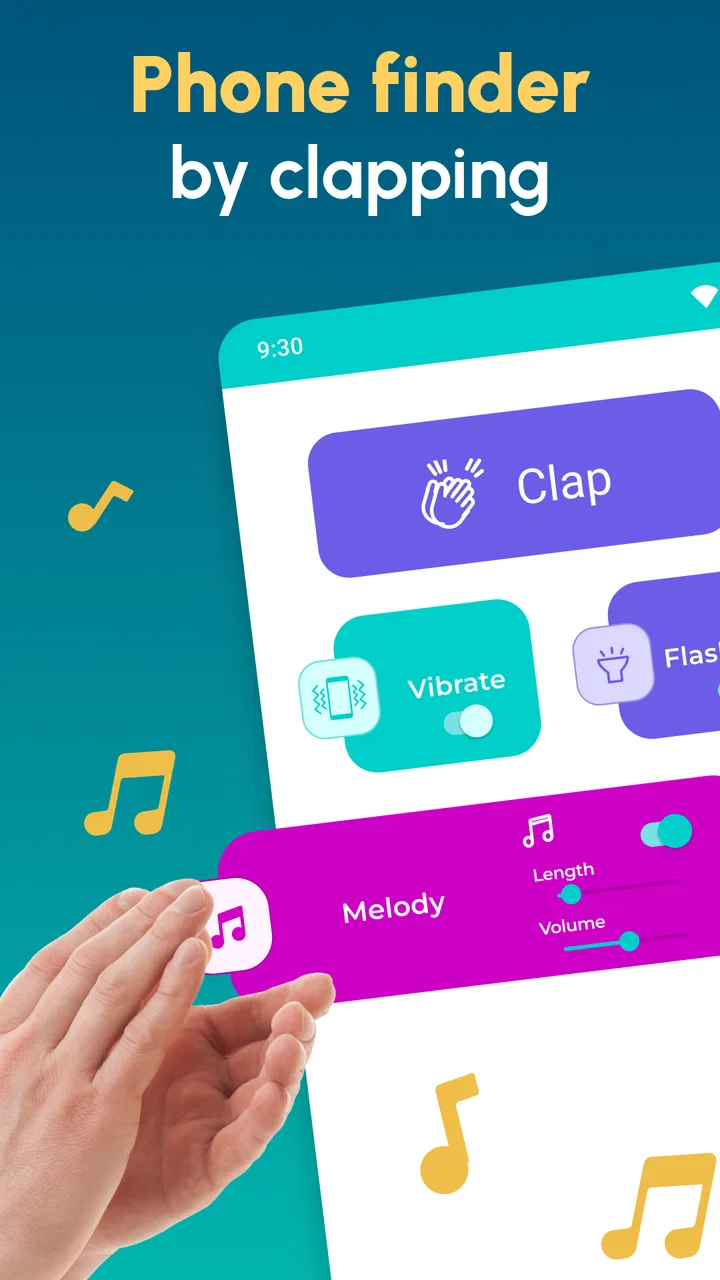
Clap to Find My Phone: Whistle helps locate a misplaced smartphone by listening for a sound trigger, such as clapping or whistling, depending on the available settings. After enabling the detection feature, you can make the chosen sound and the phone responds with an alarm, ringtone, vibration, or flashing light. In my testing, the response worked best in quiet or moderately noisy rooms and when the phone was not buried under heavy objects.
02Does Clap to Find My Phone: Whistle work when the phone is set to silent or Do Not Disturb?
The app is designed to help you find the device even when you cannot hear a normal ringtone, but its behavior may depend on Android or iOS permissions, volume settings, and the phone model. You generally need to allow microphone access and enable background activity. Some devices may restrict alarms or detection while in battery-saving modes, so it is worth testing the feature before relying on it in an emergency.
03What permissions does the app require, and are they safe to grant?
Clap to Find My Phone: Whistle normally requires microphone access because it must listen for claps or whistles. It may also request permission to send notifications, run in the background, use the flashlight, or play alerts, depending on the features you activate. Review the permission prompts carefully and grant only what is necessary. If privacy is important, check the app’s store listing and privacy policy before installation.
04Can I customize the alarm, vibration, flashlight, or detection sensitivity?
The app typically provides several practical options for adjusting how the phone reacts after recognizing the trigger. Depending on the version and device, you may be able to choose an alarm sound, enable vibration, activate the flashlight, and adjust detection sensitivity. Higher sensitivity can make detection easier from a distance, but it may also cause false responses from loud noises, music, or conversations.
05Will Clap to Find My Phone: Whistle drain my battery or work reliably in every situation?
Because the app monitors the microphone while its finding mode is active, it can use more battery than a completely inactive application, especially if left enabled for long periods. Reliability also depends on background restrictions, microphone access, surrounding noise, and whether the phone is covered or far away. For the best experience, keep the feature enabled only when needed and exclude the app from aggressive battery optimization if necessary.
Pros
- Works without an internet connection once detection is enabled.
- Useful for locating a phone under cushions
- bedding
- or in another room.
- Adjustable detection sensitivity helps reduce accidental activations.
- Can be helpful for users with limited mobility or poor eyesight.
- Simple interface makes the main phone-finding feature quick to access.
Cons
- False triggers may occur when the app detects similar sounds nearby.
- Whistling or clapping can be inconvenient in quiet public places.
- Continuous background detection may increase battery consumption.
- Performance can vary in noisy rooms or crowded environments.
- Some features may be limited by ads or require in-app purchases.

Clap to Find My Phone: Whistle
Gallery